Ergonofis Sway Review: 6 Months With This $4,000 Desk and Chair Setup
About us
About us
About us
When I moved into my new office, I knew I wanted a standing desk. I went with Ergonofis for both the desk and the chair, and I've now spent over six months with this roughly $4,000 setup.
I'm a product designer and content creator. I spend a huge part of my day at my desk. I've been using standing desks for about four years now, everything from budget options to premium ones. I've always loved how Ergonofis looks, but I also always wondered if the premium was actually worth it, especially knowing that cheaper desks work fine for the most part.
For me, standing desks aren't a gimmick. In the morning, I struggle to sit down and focus right away. Being able to ease into the day, stand for a bit, do lighter tasks, and drink my coffee while my brain wakes up makes a real difference in how I start working.
So when I set up this new space, I wanted to finally put a setup like this to the test.
What I Ordered (and Why)
The Ergonofis Sway desk only comes in real solid wood. No veneers, no particle board. It looks incredible, but it obviously drives the price up. I was curious to see if the rest of the experience would justify that.
Here's the configuration I went with:
Desktop: Walnut top, 72 inches
Legs: Black
Add-on: Cable management rack
Chair: Youtoo ergonomic chair, black frame, Smoke-Shadow color combo
I hesitated between the 60 and 72 inch version. After planning the layout in Figma and thinking through my workflow, I went with the larger size to give myself more room. If you have the space, I'd recommend going bigger. You'll use it.
I also added their cable management system from the start. One thing I've learned after years of owning standing desks: cable management is way more important than people expect, especially once the desk starts moving up and down.
Setup and Build Experience
The boxes were heavy. That's just the reality of a real solid wood top.
The build itself is straightforward, but it's not IKEA-simple. I had to check the manual a few times, mostly because the next step isn't always obvious. Think of it like a complex IKEA build. Not difficult, but you do need to pay attention.
A small tip: use the box and packing materials to protect the desk surface while assembling it. With a finish like this, you really don't want to scratch it before you've even started using it.
You'll also want someone to help you flip the desk once the legs are attached. You could do it alone, but you'll end up choosing between your back and your desk. Get help.
Design and Materials
This is where the Ergonofis Sway starts to separate itself from everything else I've used.
The natural walnut is genuinely beautiful. Photos and videos don't do it justice. It brings an elevated, warm feel to the room that no laminate or veneer desk has ever come close to in my experience. The finish is smooth to the touch while keeping that natural wood look and texture.
It also feels incredibly solid, like it will last a lifetime. It comes with a 10-year limited warranty, which backs that up.
I will say that real wood does bring some vulnerability. Water marks, scratches, dropping something on the surface, these are real considerations. But to me, that trade-off is worth it. The desk just looks that much better than the alternatives.
Build Quality, Motors, and Stability
This is where the real functional advantage lives.
Mid-range standing desks have gotten much better over the years. They've fixed a lot of the major issues around motors and stability. But the Ergonofis Sway still outperforms them in a noticeable way.
Motor performance: The desk uses dual motors and can lift up to 360 pounds. It's not silent (it is still a piece of moving furniture), but it's the quietest standing desk I've personally used. Compared to both cheaper and other premium desks I've tested, the movement feels smoother and more controlled.
Stability: Excellent at every height, from sitting all the way up to standing. This matters more than people think. The last thing you want is a desk that starts to wobble when it's fully extended. This is usually where cheaper desks fall apart. They tend to get shaky in standing mode. The Sway doesn't.
Anti-collision system: Pretty standard across most price points now, but it has genuinely saved my camera a few times when things were in sketchy positions.
Manufacturing: The desk is handmade in Montreal. As someone who lives here, that's cool. They're also B Corp certified with a strong focus on sustainability, which adds to the overall quality story.
Cable Management
The desk comes with a cable net, which helps, but I also added their cable management rack. For a standing desk, this is close to essential.
With everything moving up and down, cables get messy fast. You basically have to tie everything to the desk itself. This rack includes a power bar and lets you attach all your cables directly to it, which means you end up with a single cable running down to the wall.
As a content creator who constantly moves things around (and sometimes completely clears the desk to shoot products), this setup makes it really easy to add or remove gear while keeping everything clean.
The Gesture Control System
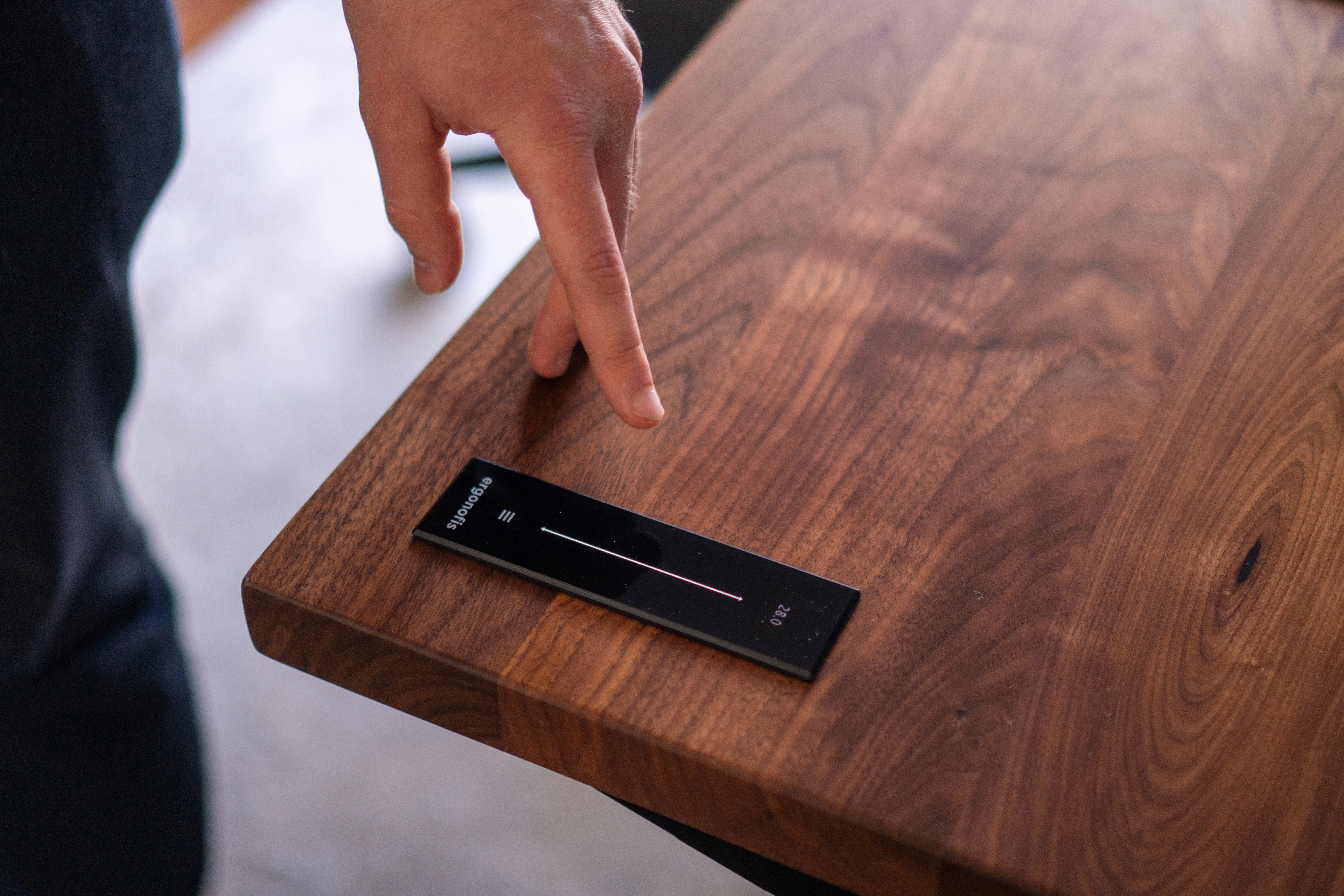
One of the most unique parts of this desk is the OLED gesture controller. Instead of pressing buttons, you swipe between sitting and standing.
As a product designer, this is the kind of detail I really appreciate. It's a unique solution that looks great and feels intuitive. I don't have to look down or aim for a specific button. I just swipe up or down and keep working.
Setup is simple: you set your sitting height and your standing height, and that's it. One thing that doesn't get mentioned enough is that adjustable desks also let you dial in the perfect sitting height, which is just as important as standing. We all have different bodies, and that adjustability really matters.
I was surprised to see some reviews mention a learning curve, because the core interaction felt natural to me immediately. That said, there are features I didn't discover right away, like built-in sit-stand reminders and support for two user profiles. Those features are in the manual, but they aren't immediately obvious on the controller itself.
In UX terms, that's a discoverability issue. The features are there and they work, but you have to know to look for them.
The reminders themselves are subtle (just an icon and a light vibration). When I'm fully focused, I don't always notice them. Personally, I switch positions intentionally between tasks, so it's not something I rely on, but it's worth knowing about.
One other note: the controller takes up some desk space and can only be set up on the right side. On a 72-inch desk, that hasn't been an issue for me, but on a smaller configuration, it's something to consider.
Ergonofis Youtoo Chair Review
When I swipe down to sit, I obviously need a chair. I went with the Youtoo ergonomic chair, and it's been a great match for this desk.
What I wanted was a chair with all the ergonomic adjustments I need for long workdays, without looking overly technical or bulky. The Youtoo nails that balance.
More importantly, after long hours of sitting, I never feel pressure points or pain anywhere. It's just consistently comfortable. That's the highest compliment I can give a chair.
Adjustments include:
Height and armrests (standard)
Adjustable lumbar support
Back height
Seat depth
All of it is discreet and doesn't take away from the clean, minimal design. Not every chair in this range includes all of these.
Visually, I love how it contrasts with the desk. The Smoke-Shadow color combo brings some lightness into the room and ties the whole setup together. It comes with a 12-year warranty, which says a lot about how it's built.
Is the Ergonofis Sway Worth It?
After six months, switching between sitting and standing just feels like part of my routine. I don't think about it anymore. I usually start mornings standing, easing into lighter tasks with coffee, then naturally move to sitting when I need to lock in and focus.
Here's my honest take on who this setup is (and isn't) for.
If you're on a budget: a good mid-range standing desk will give you most of the functional benefits. Budget and mid-range options have gotten genuinely good over the past few years, and being able to move throughout the day makes a noticeable difference regardless of what desk you buy.
If you care about design, materials, and how your space looks and feels: this setup makes a lot of sense. I spend a huge part of my life at this desk, designing, thinking, creating content. Every time I walk into the room, I enjoy being there.
The natural wood, the build quality, the way the gesture control blends into my workflow. All of these small details add up. For me, that's what makes the premium worth it.
Items Mentioned
Here are links & discount codes to the items mentioned in this article.